

How to use the dashboard features in the planning tool
This guide explains how to use the presentation, download, and dashboard features in the planning tool – making it easy to track and share your progress.
Welcome to Meridian's online financial planning tool. Your financial plan is designed to help you create a personalized roadmap for your financial goals. Whether you're saving for a home, planning for retirement, or managing debt, this tool is designed to help you get OnYourWay.
Step 1: Get to know the dashboard
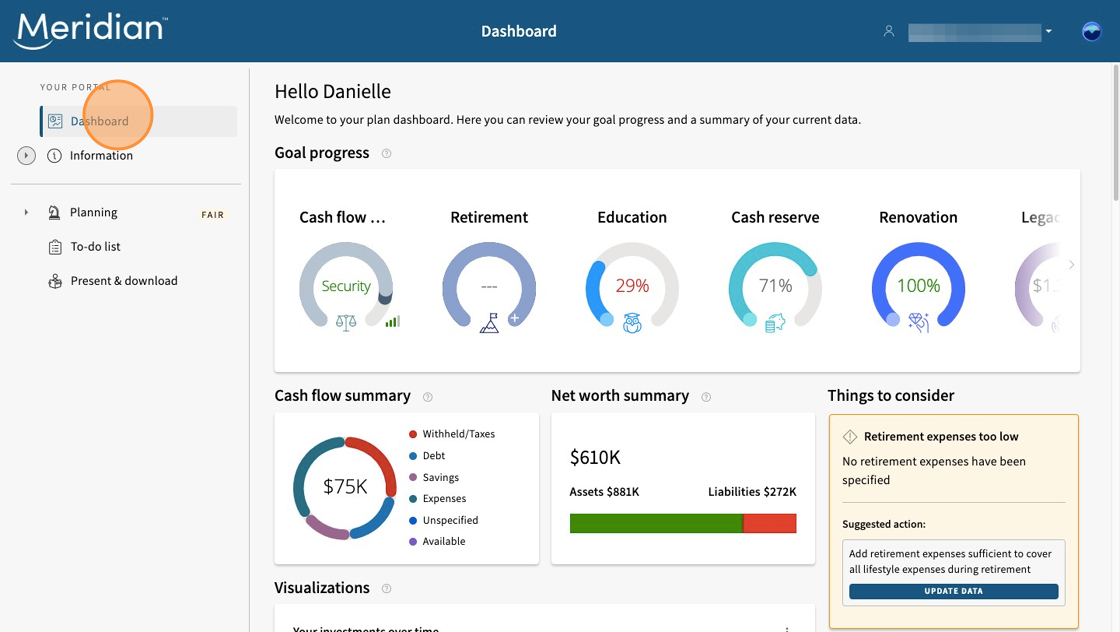
At any time, navigate to the "Dashboard" tab where you can review your goal progress, get a summary of the information you have entered in your plan, and get tips and plan insights.
Step 2: Download or present your plan
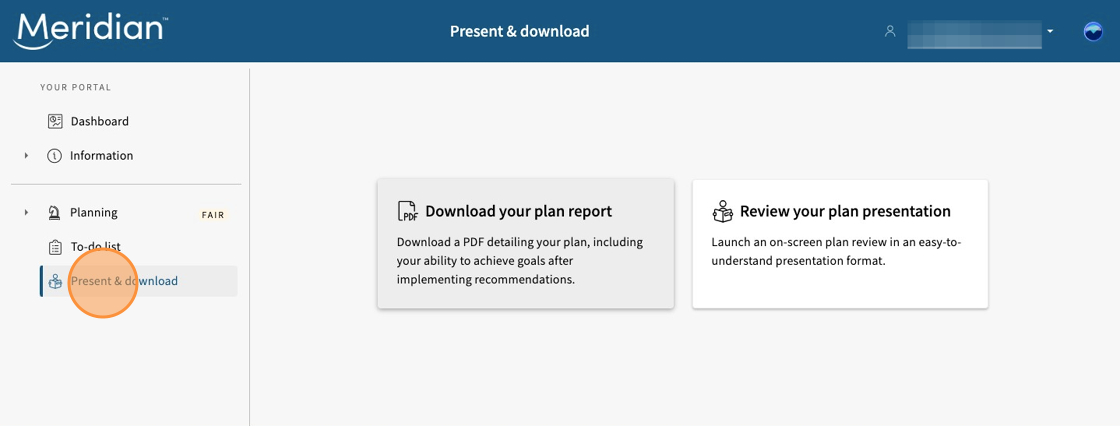
In the "Present & download" section, you'll be able to download a PDF copy of your plan or review it on screen in presentation mode. This feature makes it easy to:
- Share your plan with a financial advisor, family member, or trusted contact.
- Review your goals and strategies anytime.
- Keep a record of your progress and updates.
Your plan is designed to be flexible — so you can revisit and revise it as your life and financial needs evolve.
Learn more about using the planning tool
Get the most out of our planning tool by exploring more user guides and answers to frequently asked questions.
All planning tool user guides Frequently asked questions About the planning tool