

Resources
Manage Your Credit Card
Explore all the ways you can make your credit card work for you. Learn how to activate your card, redeem rewards, manage your security and alert settings, and more.
Keep your account secure
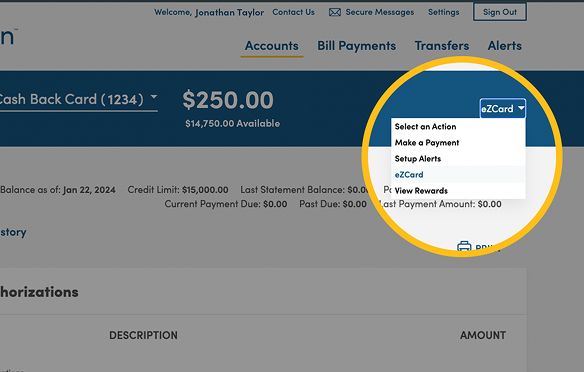
Use eZCard to manage your credit card account and redeem rewards
Why am I getting fraud alerts from Meridian?
Each time you use your Meridian Visa, our fraud detection system learns more about your transactional behaviour so it can better identify potentially unauthorized transactions or fraudulent activity. As a result, you may receive a fraud alert through a text message, call, and/or email when making a purchase. When the system identifies an unusual transaction, the alert message will ask you to verify whether the transaction is legitimate.
Tips for handling fraud alerts
- Text message alerts will come from the short code “869750”. If you do not have an SMS-enabled device you will receive a robo voice call (between 8 a.m. and 9 p.m., your local time)
- Email alerts will come from [email protected]. Note: Please ensure that you respond only to messages from these specific senders.
- If you receive an alert, please proceed with the verification process as outlined above. Note: If your transaction is declined and you have not received a Fraud Alert notification, please check your email spam folder.
- If you deleted or ignored an alert, you can also validate a transaction by calling the number on the back of your card.
- To receive these important alerts in a timely fashion with minimal interruption to transactions, please ensure that we have your current contact information on file.
Questions about your credit card?
We’ve got answers you’re looking for. Check out our frequently asked questions – we answer all your questions about activating your card, making changes to your account and cardholders, credit card security, rewards, payments, and more.
All the easy ways to pay

Mobile wallet
Contactless payment
Chip and PIN
Visa Cardholders
Visa card support
Our dedicated Cardholder Service team is available to answer your questions 24 hours a day, 7 days a week.